How Can We Help?
Email Log
The Email Blast Log in RunHOA allows administrators to review previously sent Email Blasts and track recipient delivery results, including bounced emails.
The Email Blast Log helps associations maintain a complete history of:
- Email Blast subjects
- Send dates
- Sender information
- Email Groups used
- Individual recipient delivery status
Accessing the Email Blast Log
Go to:
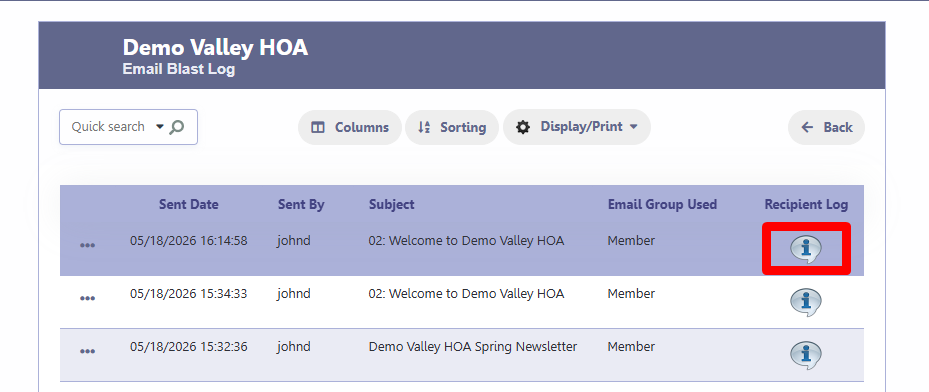
Email Blast > Email LogThe Email Blast Log screen displays all previously sent Email Blasts.
You can view:
- Sent Date
- Sent By
- Subject
- Email Group Used
- Recipient Log
Recipient Log
Each Email Blast includes a Recipient Log icon.
Click the Recipient Log icon to view detailed delivery information for each recipient.
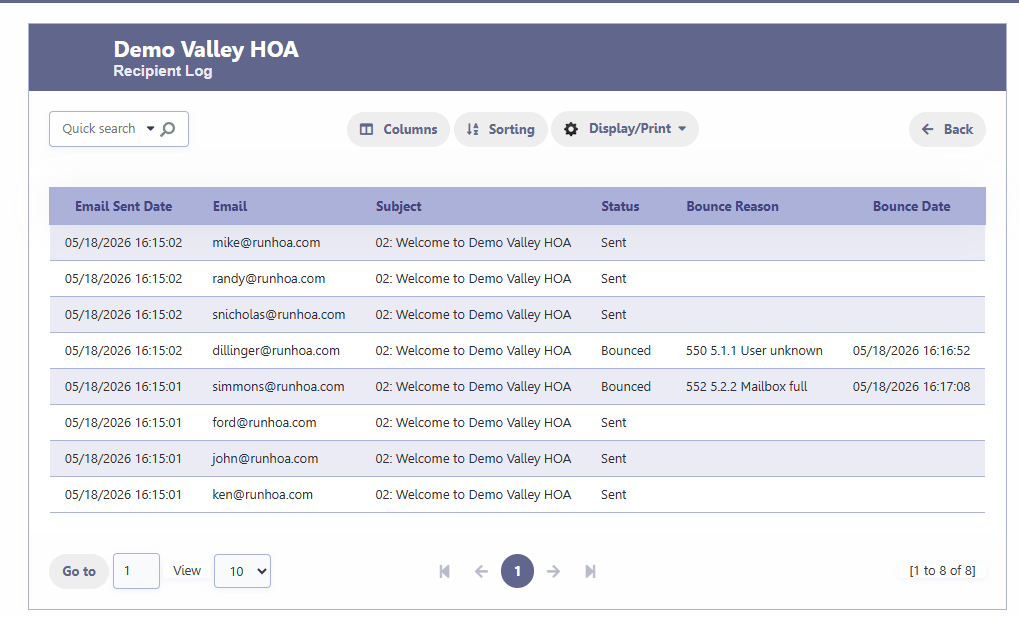
The Recipient Log displays:
- Email Sent Date
- Recipient Email
- Subject
- Status
- Bounce Reason
- Bounce Date
Understanding Status Values
Sent
The email was successfully accepted by the SMTP mail server for delivery.
Example:
SentBounced
The email could not be delivered to the recipient.
Examples include:
- Invalid email address
- Mailbox full
- Recipient server rejection
- Spam rejection
Example bounce reasons:
550 5.1.1 User unknown
552 5.2.2 Mailbox full
550 5.7.1 Message rejected as spam
Bounce Tracking
RunHOA tracks bounced emails and displays:
- Bounce Reason
- Bounce Date
This helps administrators identify:
- outdated owner email addresses
- invalid domains
- delivery issues
Searching and Filtering
The Email Blast Log supports:
- Quick Search
- Sorting
- Column selection
- Print and Export options
You can quickly locate:
- a specific Email Blast
- emails sent by a specific administrator
- a particular recipient
Common Uses
Associations commonly use the Email Blast Log to:
- verify Email Blasts were sent
- review delivery status
- investigate bounce issues
- maintain communication records
- confirm homeowner notifications
Tips
- If multiple emails bounce for the same owner, verify the email address in the Owner Directory.
- Large Email Blasts may take several minutes to fully process.
- Bounce reasons are generated by the recipient’s mail server and may vary depending on the provider. It usually takes a day for the bounce reason to show.