How Can We Help?
Owners Information Collection
Owner Information Collection Using the Submit Registration Info Link
When setting up RunHOA for the first time, many HOA administrators may not have complete owner contact information in their Owners Directory. To help gather missing information directly from homeowners, RunHOA provides a Submit Registration Info feature.
This feature allows owners to securely submit their contact information, which can then be reviewed and manually added to the Owners Directory by an HOA administrator.
Please make sure you have atleast set up all your units first
Step 1: Locate the Submit Registration Info Link
Navigate to:
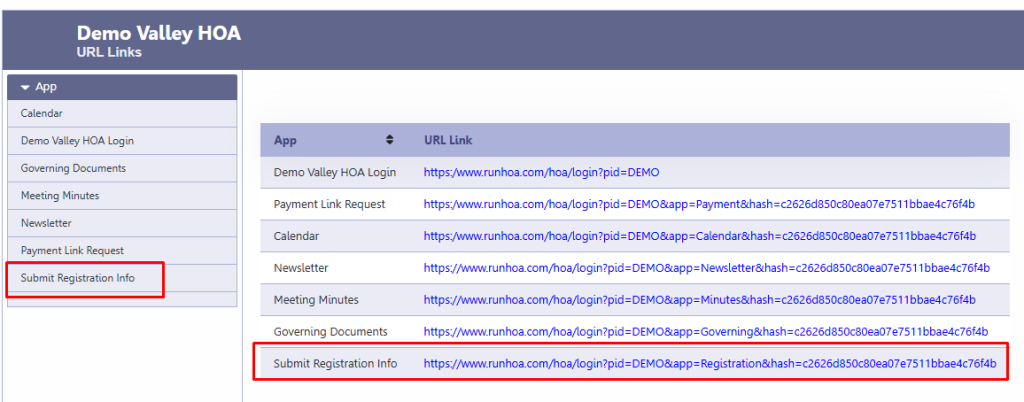
Administration → URL Links
On the URL Links screen, locate the Submit Registration Info link.
This unique link can be:
- Emailed to homeowners
- Posted on your HOA website
- Included in newsletters or welcome packets
- Shared through community communications
The link allows homeowners to submit their information without requiring a login.
Step 2: Owner Completes the Registration Form
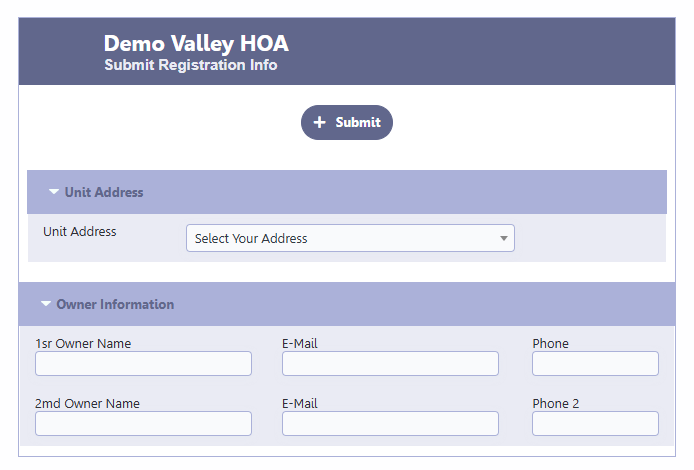
When an owner opens the link, they will see the Submit Registration Info form.
Required Fields
The following fields are mandatory:
- Unit Address
- 1st Owner Name
- 1st Owner Email Address
Optional Fields
Owners may also provide:
- Phone Number
- 2nd Owner Name
- 2nd Owner Email Address
- Phone Number 2
- Additional information requested on the form
Once completed, the owner clicks Submit.
Step 3: Review Submitted Information
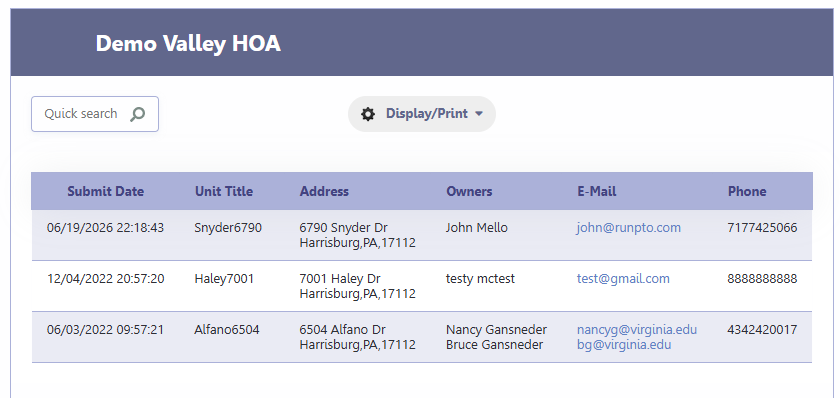
After an owner submits the form, the information is stored in RunHOA for administrator review.
Navigate to:
Administration → Submitted Owners Info
The submissions are automatically displayed in Submitted Date order, with the newest submissions appearing first.
The grid includes information such as:
- Submission Date
- Unit Address
- Owner Name(s)
- Email Address(es)
- Phone Number(s)
Step 4: Verify the Information
Before updating your Owners Directory, review the submission to determine whether it appears legitimate and belongs to the correct property owner.
Common verification methods include:
- Matching the owner name to HOA records
- Confirming the unit address
- Verifying the email address with the homeowner if necessary
- Checking against existing ownership records
Step 5: Update the Owners Directory
Once the information has been verified:
- Open the appropriate Unit/Owner record in RunHOA.
- Manually update the owner information using the submitted details.
- Save the changes.
This manual review process helps ensure that only accurate and verified information is added to the Owners Directory.
Recommended Use Cases
The Submit Registration Info feature is especially useful when:
- Migrating from spreadsheets or paper records
- Starting a new RunHOA account
- Missing owner email addresses
- Missing phone numbers
- Updating outdated owner contact information
- Encouraging owners to maintain accurate records
Notes
- The Submit Registration Info form does not automatically update the Owners Directory.
- All submissions require administrator review.
- The administrator determines whether the information should be added to HOA records.
- New submissions are available under Administration → Submitted Owners Info for easy review and processing.
Using this feature can significantly reduce the time required to build and maintain an accurate Owners Directory while keeping HOA records under administrator control.