How Can We Help?
How to Set Up Email Notifications for Amenity Reservations
Overview
You can configure a contact person (coordinator) to receive an email notification every time an amenity is booked.
Steps
- Go to:
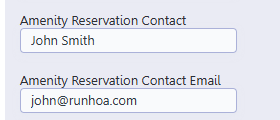
Administration → Setup → Administration Contact Setups - Locate the fields:
- Amenity Reservation Contact
- Amenity Reservation Contact Email
- Enter:
- Name of the coordinator
- Email address where notifications should be sent
- Click Save
What Happens Next
- Every time a user books an amenity, an email notification will be sent to the configured contact.
- The email will include reservation details such as:
- Amenity name
- Date
- Time
- Number of guests
Notes
- Only one email address is supported in this field.
- Make sure the email is valid to ensure delivery.
- If emails are not received, ask the recipient to add @runhoa.com to their trusted senders.